ESXi5 Datastore error – Expected put message. Got: ERROR

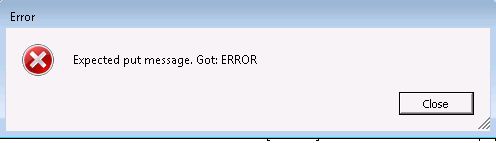
When trying to download a VMX file via the datastore browser, I was presented with the following error “Expected put message. Got: ERROR” as shown below:Expected Put Message. Got Error
This had be stumped for a moment as i have never encountered this before. The following knowledge base by VMware explains this behaviour and how to overcome.

Luckily I was in the position to power of the virtual machine and download the VMX file and power back on. Though when I tried again with the virtual machine powered back on, same issue occurred.

I did find when vMotioning between hosts (same datastore) I could then download the VMX file with the virtual machine still on.

I have read that similar people have had issues with brackets in the virtual machine name (wasn’t the case here) that can get confused with the datastores (as brackets define datastores). Might be worth watching out for this one.

This was using VMware ESXi 5.0.0 768111.

Open University – B120 – An introduction to business studies

I don’t normally blog about my success with the Open University (I do tweet from time to time) but at the moment I am buzzing. I am studying towards a degree in BSc Computing & IT and Business and am currently studying B120 – An introduction to business studies.

I have completed two assignments and even though I have found this course so damn hard (not knowing anything about business) I have been surprising myself and doing really well! by using simple techniques from college – understand and deciphering the question.

When I get feedback such as:

Your application of Hackman and Oldham was quite simply the best I've seen on any B120 presentation, it had the lot.  I would never give full marks for anything easily - and I will always look for one little slip that allows me to give under fullmarks.  But I couldn't find one - worth the 40 marks - very well done.

I feel epic and knowing what I am doing is correct! I tend to put a lot of pressure on myself, if I know something is awful… I have to keep going (even when hitting a brick wall) this was true of my last assignment and got to the point where I just submitted… the score? 88/100 (distinction) and the comments above.

I think sometimes I am too hard on myself, Will I stop being hard on myself? no chance it has results! I know if I stop… I’ll start slacking and the scores will reflect this

This has motivated me to keep on going and to achieve more success with the Open University and  with other aspects in my life. If you work hard and are dedicated, results will follow.

2008R2ClearCache

Server 2008 R2 clear DNS cache to get Internet working on clients

First week of new job and going rather good as well as experiencing some strange behaviour… one of our clients had an unusual error with the Internet not working on all client machines. They were attached to the network fine and the server had Internet access.

Seems there may be a bug in Server 2008 R2 which may require the DNS cache to be cleared… and boom the clients had Internet access….

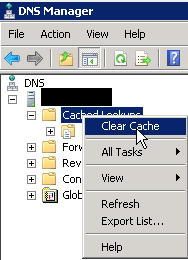
Within DNS Manager, right click “Cached Lookups” and select “Clear Cache”.

2008R2ClearCache

Upon a further inspection it seems this may be related to KB  968372:  Windows Server 2008 and Windows Server 2008 R2 DNS Servers may fail to resolve queries for some top-level domains

I haven’t tried the above fix, but will be worth a try if the issue happens again.

Nexus 7 - VMware Mobile Knowledge Portal

VMware Mobile Knowledge Portal iPhone/Android Tablet app

VMware have a nifty app for Android and iOS tablet devices that allow you to read white papers, watch installation videos and best practices on the go. Useful if you don’t have a laptop handy but do have a tablet.

The VMware Mobile Knowledge Portal app provides access to VMware published content, and other rich media. You can use this application to watch installation videos, view helpful demos, read product whitepapers, and benefit from expert advice. We will continue to introduce new versions of videos, demos and the other product documentation right here.

Key Features:

  • Evaluation Videos: A library of support videos and evaluation guides is available to help you learn more about VMware products.
  • What’s New: Complete set of product documentation, datasheets, informative white papers and much more.
  • Best Practices: Best practices and advice from VMware experts on all our offerings.

Nexus 7 - VMware Mobile Knowledge Portal

Download here for both Android and iOS

PPP_PAP_CHAP

Cisco ICND2 – Configure and verify PPP connection between Cisco routers

PPP stands for Point-to-Point and is a protocol operating at Layer 2 of the OSI model.

HDLC is Cisco proprietary and is the default encapsulation on serial links great if you have all Cisco devices, otherwise you will need PPP configured.

There are two types of authentication that can be used with PPP. These are PAP and CHAP.

PAP (Password Authentication Protocol) – Passwords are sent in plain text. No periodic checks.

CHAP (Challenge Handshake Authentication Protocol) – Password is encrypted. Sends periodic checks to ensure the router is talking to the same router.

PPP_PAP_CHAP

Configuring PPP is rather simple:

configure terminal
int s2/0
encapsulation ppp

Configure PPP with PAP authentication

RouterA:

configure terminal
hostname RouterA
username RouterB password Cisco

int s2/0
ip address 10.0.0.1 255.255.255.0
encapsulation ppp
ppp authentication pap
ppp pap sent-username RouterA password Cisco

RouterB:

configure terminal
hostname RouterB
username RouterA password Cisco

int s2/0
ip address 10.0.0.2 255.255.255.0
encapsulation ppp
ppp pap sent-username RouterB password Cisco
ppp authentication pap

Configure PPP with CHAP authentication

RouterA:

configure terminal
hostname RouterA
username RouterB password Cisco

int s2/0
ip address 10.0.0.1 255.255.255.0
encapsulation ppp
ppp authentication chap

RouterB:

configure terminal
hostname RouterB
username RouterA password Cisco

int s2/0
ip address 10.0.0.2 255.255.255.0
encapsulation ppp
ppp authentication chap

Show commands:

show interface s0/0 – Look for encapsulation ppp and LCP is open. Check interface is up and line protocol is up. Password/Username or encapsulation mismatch will bring the line protocol down.

Debug:

debug ppp authentication – Look for any failures of the three-way handshake.

Cisco ICND2 – Describe VPN technology (including: importance, benefits, role, impact, components)

VPN stands for Virtual Private Network and extends network access to that beyond its current network. There are different types of VPN, these are:

  • Site-to-site VPN – Connects a company remote sites over the Internet together
  • Remote access VPN – Allow users to connect in from any remote location outside of the company over the Internet.

IPSec operates at layer 3 of the OSI model. IPSec is an industry standard created by IETF that provides security at the network layer.

Authentication Header (AH)  – Sender and receiver generate the same one-way hash. If packet has been changed it will be dropped.

Encapsulation Security Payload (ESP) – Provides data confidentiality, data integrity and replay service.

Symmetric encryption uses a shared secret to encrypt and decrypt. DES, 3DES and AES are different types of encryption.

Assymmetric encryption uses private and public keys. Public key is shared but private key is only know to the host. RSA is common encryption.

Benefits:

  • Cheaper – No need to get a second line to link sites, can use VPN and use existing connections to the Internet
  • Encrypted making the connection secure
  • Can have more than one VPN connection – Can connect to mutliple sites and allow remote users

Disadvantages:

  • Requires more overhead on the Router for encryption/decryption

Cisco ICND2 – Troubleshoot WAN implementation issues

Somethings to look out for when troubleshooting WAN implementation issues:

  • Mismatched IPs
  • debug ppp authentication – Will show if any authentication issues (password mismatch)
  • Encapsulation mismatch – ppp and HDLC for example
  • show cdp neighbors detail
  • show frame-relay lmi
  • show frame-relay map
  • show frame-relay pvc
  • show running-config
  • show interface s0
  • Frame relay encapsulation mismatch
  • debug frame-relay lmi